
Open-source firmware, built-in digital modes, remote operation, and a growing community of amateur radio developers are changing what these popular portable HF transceivers can do.
One of the things I enjoy most about amateur radio is that there’s always something new to explore. Just when you think you’ve figured out everything your equipment can do, someone comes along with an idea that changes how you look at it.
That’s exactly what’s happening with the Xiegu X6100 and X6200.
Both radios have earned a place in the portable amateur radio community. They’re compact, reasonably affordable, and packed with features that make them attractive for everything from operating at home to heading out for a Parks on the Air (POTA) activation. But as capable as these little radios are, their factory firmware hasn’t always taken full advantage of what the hardware can offer.
That’s where OpenX6X00, an open-source alternative firmware project maintained by RF.Guru, enters the picture.
Instead of waiting for the manufacturer to introduce new features, amateur radio developers are building their own improvements, adding capabilities, and giving operators more control over their equipment.
And some of those improvements are pretty impressive.
What Is OpenX6X00?
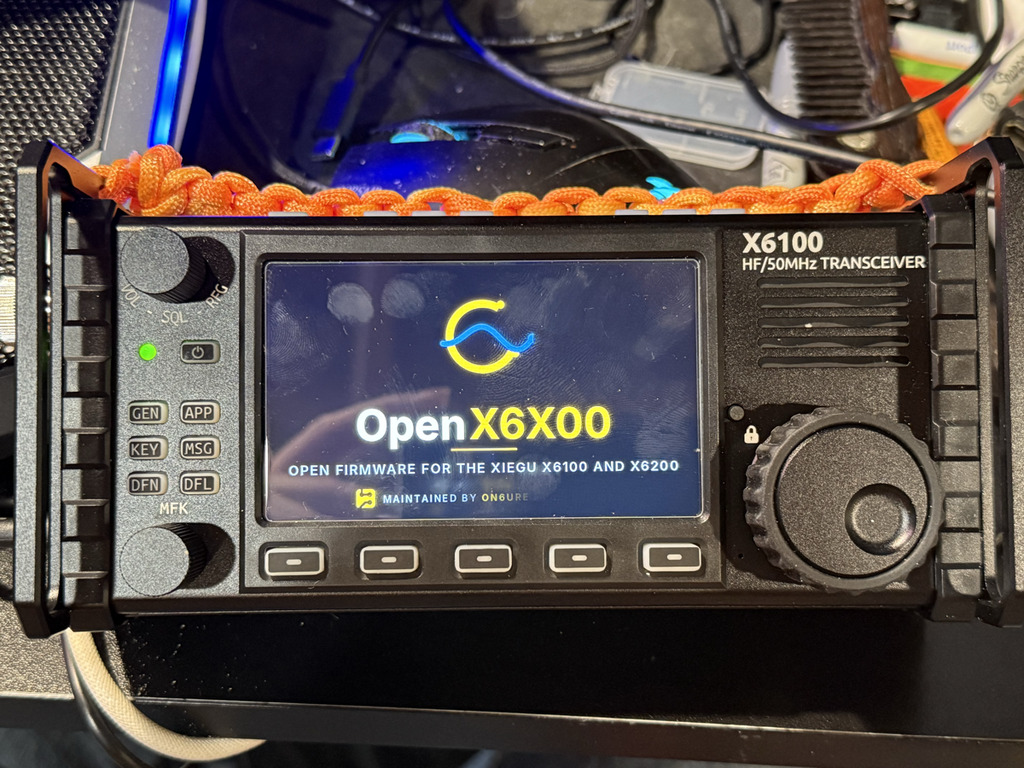
OpenX6X00 is a community-developed firmware replacement for the Linux-based operating environment used by the Xiegu X6100 and X6200.
Unlike a traditional firmware update that simply fixes a few bugs or changes a menu, OpenX6X00 substantially changes how you interact with the radio.
It introduces a redesigned user interface, expands digital-mode capabilities, incorporates network-based features, and provides additional tools aimed at portable operators.
The project is maintained by Joeri Van Dooren, ON6URE, through RF.Guru, and builds on earlier community firmware developed by Oleg Belousov (R1CBU), Georgy Dyuldin (R2RFE), and Giovanni Ricciardi (IU1WXY).
The current project grew from the last open-source release of IU1WXY’s firmware, version 0.127, released in October 2026. When subsequent versions moved to a proprietary development model, OpenX6X00 continued the open-source branch.
That history matters because this isn’t simply a different-looking interface. It’s the continuation of years of work by amateur radio developers who believe operators should have the freedom to examine, modify, and improve the software running on their equipment.
Digital Modes Without All the Extra Equipment
For me, one of the most interesting aspects of OpenX6X00 is its approach to digital modes.
Traditionally, operating FT8, FT4, or other sound-card digital modes means connecting a radio to a computer, configuring CAT control, setting audio levels, and launching the appropriate software.
There’s nothing particularly wrong with that arrangement. Many of us have been using it successfully for years.
But imagine taking your X6100 or X6200 into the field and operating digital modes without carrying a separate laptop.
OpenX6X00 makes that possible by incorporating digital-mode applications directly into the radio’s operating environment.
Depending on the mode, operators can decode received signals, compose messages, and transmit using the radio’s built-in interface.
The project supports a broad selection of modes and applications, including:
- FT8 and FT4 for weak-signal digital communication.
- JS8 for keyboard-based weak-signal messaging.
- WSPR for propagation reporting and experimentation.
- RTTY, PSK31, PSK63, and Olivia.
- SSTV for exchanging images over amateur radio.
- FreeDV and its RADE digital voice capability.
- CW decoding and related operating tools.
For someone interested in portable digital operation, this changes the equipment equation considerably.
A radio, an antenna, and a suitable power source could be enough for many activities that previously required a computer sitting beside the transceiver.
Of course, a small built-in display won’t necessarily replace the convenience of a full-size computer running WSJT-X or other specialized applications. But having those capabilities available directly on the radio is a substantial advantage, especially when traveling light.
Built With POTA and SOTA Operators in Mind
Portable operating has become one of the most active areas of amateur radio, and OpenX6X00 clearly reflects that interest.
The firmware includes tools specifically designed to support amateur radio activation programs.
Parks on the Air (POTA) and Summits on the Air (SOTA) are supported, along with a collection of other outdoor and award-based operating programs involving castles, towers, lighthouses, lakes, and other locations.
What makes this especially useful is that the features aren’t simply buried inside a collection of menus.
The interface includes large, outdoor-friendly controls intended to make activation-related information easier to access.
For an operator sitting at a picnic table or working from a remote location, that can make a difference.
Portable operating should be about making contacts and enjoying the experience, not spending half your activation navigating menus or troubleshooting equipment.
Having operating tools built directly into the transceiver helps reduce some of that complexity.
A Fresh Look at the Radio’s Display
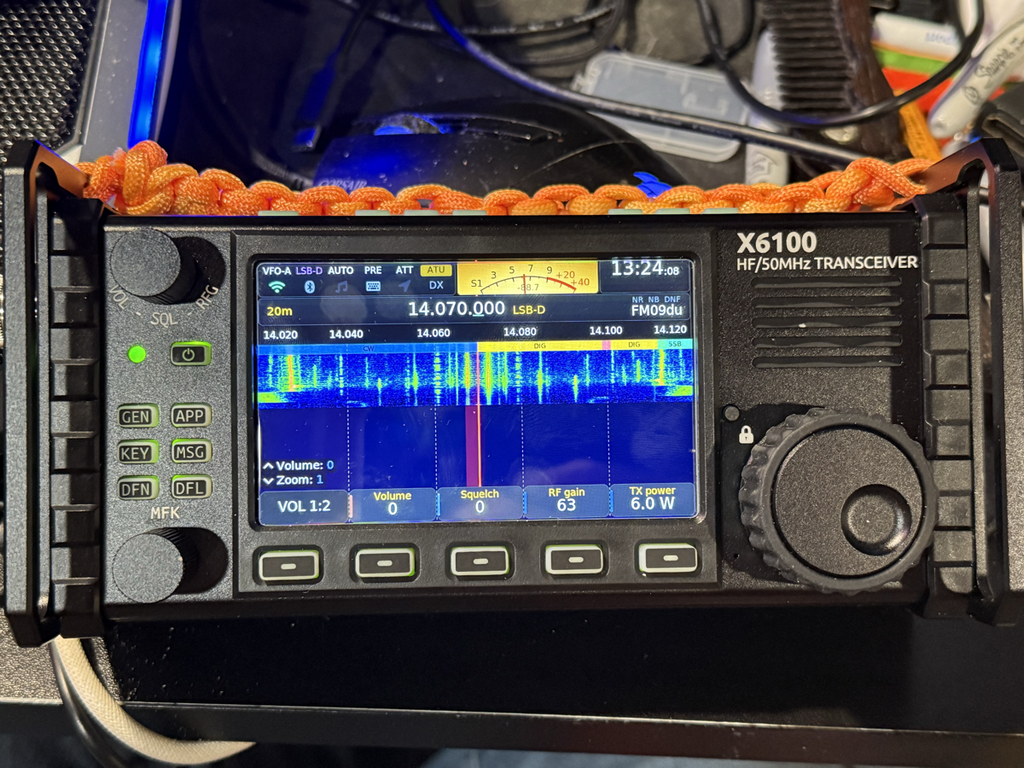
The X6100 and X6200 already offer graphical interfaces, spectrum displays, and waterfalls, but OpenX6X00 takes the presentation considerably further.
The firmware introduces different display themes, redesigned menus, additional spectrum visualization options, and a more flexible operating environment.
Among the available features are a 3D band scope, an integrated band-plan display, and DX cluster callsigns displayed alongside activity on the waterfall.
That last feature is particularly interesting.
Instead of switching between a radio display and a separate DX cluster application, operators can see spotting information associated with activity in the spectrum display.
It’s the kind of integration that makes you wonder why more radios don’t offer it as a standard feature.
The project also supports multiple themes, allowing operators to choose an appearance that better suits their preferences and operating conditions.
The result is a radio that can feel quite different from the one that originally came out of the box.
Remote Operation Through a Web Browser
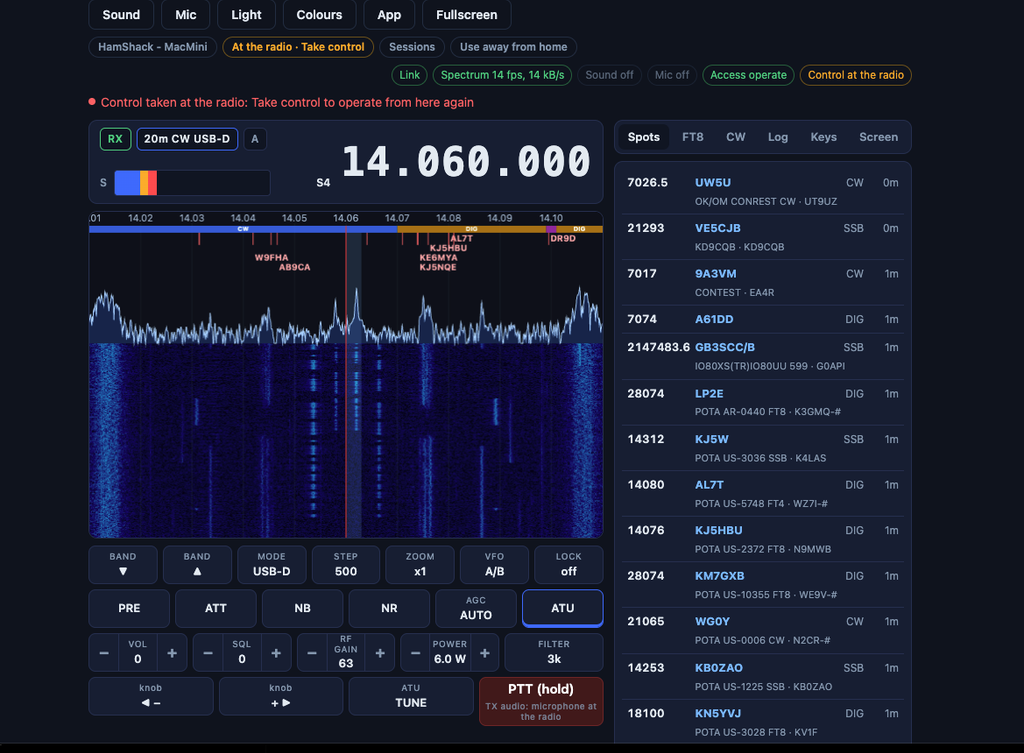
Another feature that deserves attention is OpenX6X00’s browser-based remote operation.
With the radio connected to a network, an operator can access its interface using a compatible web browser.
The system supports remote control of radio functions, viewing the radio’s display, receiving audio, and transmitting audio through a browser microphone.
That opens up some interesting possibilities.
You could have your X6100 or X6200 positioned elsewhere in the house while operating from a desktop computer. You could also use a tablet or another compatible device to interact with the radio without sitting directly in front of it.
OpenX6X00 includes integration with Tailscale for accessing the radio remotely over a private network connection, without needing to expose ordinary radio-control ports directly to the internet.
The project also implements pairing and transmit-permission controls intended to prevent unauthorized operation.
These are useful additions, although anyone enabling remote transmitting should still consider network security, station supervision, and the applicable FCC requirements.
Remote operation isn’t a substitute for responsible station control.
More Than Just a New Interface
Once you start looking through the project documentation, it becomes apparent that OpenX6X00 is doing more than adding attractive screens and digital modes.
There are features involving Bluetooth, CAT control, logging integration, network-based radio control, and even Winlink email over HF.
The Winlink capability is especially noteworthy for operators interested in emergency communications and off-grid messaging.
OpenX6X00 incorporates Winlink-related software and modem support, potentially allowing compatible HF messaging activities directly from the radio.
That doesn’t mean every modem, connection type, or operating scenario will perform identically to a dedicated computer-based Winlink installation. Some implementations are experimental, and practical performance will depend on software maturity and the available radio configuration.
Still, the direction is exciting.
We’re seeing a compact portable transceiver evolve into something much closer to a self-contained digital communications platform.
Open Source Means More Than Free Software
One aspect of this project that I particularly appreciate is the open-source philosophy behind it.
There’s an important difference between software that’s free to download and software whose source code is available for inspection and modification.
OpenX6X00 provides publicly available source code, allowing developers to examine how the firmware works, contribute improvements, investigate bugs, and build their own versions under the project’s applicable licenses.
The maintainers also emphasize privacy.
According to the project documentation, OpenX6X00 doesn’t require an account, a companion mobile application, or a proprietary update service to operate.
Optional online functions, such as DX cluster access, spotting networks, and logging integrations, communicate with their respective services when enabled.
Firmware updates are distributed through GitHub, and the project provides an update mechanism with rollback protection.
That independence is appealing.
Amateur radio has always encouraged learning, experimentation, and understanding what happens inside our equipment.
Open-source firmware follows that same tradition. It gives technically curious operators an opportunity to look beyond the front panel and participate in how their radios evolve.
And unlike a closed software product that depends entirely on one company or developer, an open project can potentially continue even when individual contributors move on to something else.
That doesn’t guarantee long-term support, but it gives the community a way to carry the work forward.
Installing OpenX6X00: What You Should Know
One of the advantages of OpenX6X00 is that installation doesn’t normally require permanently replacing the radio’s factory operating system.
The alternative Linux environment runs from a microSD card, while Xiegu’s original system remains in the radio’s internal memory.
That means operators can generally return to the factory operating environment by powering down and removing the OpenX6X00 card.
The basic installation process involves downloading the image designed for your particular radio, writing it to a microSD card using software such as balenaEtcher, inserting the card, and powering up the transceiver.
The developers recommend a quality 8–32 GB microSD card and external power for the initial boot.
There’s an important distinction here: the Linux operating environment and the radio’s baseband firmware are two different things.
OpenX6X00 replaces the Linux-side software, but it doesn’t automatically replace Xiegu’s baseband firmware, which handles important radio functions.
Compatibility between the alternative firmware and the installed baseband version matters, so operators should verify the supported combinations before proceeding.
It’s also worth remembering that this is third-party firmware, not an official Xiegu release.
Installing unofficial software can introduce problems, and the manufacturer or distributor may not provide support for issues caused by modified firmware. Warranty implications should be checked before making changes.
My approach would be to preserve the original configuration, read the installation documentation carefully, and use a separate microSD card rather than overwriting an existing working setup.
If you’re experimenting with alternative firmware, having a reliable way back is always a good idea.
Is OpenX6X00 Ready for Everyday Operation?
As of November 14, 2026, OpenX6X00 has reached version 0.3.12, released on November 13.
Development has been moving quickly, with updates addressing radio compatibility, operating features, usability, and software reliability.
The X6200 is also receiving active development attention rather than being treated as an afterthought to the X6100.
However, this remains a relatively young community project, and not every feature has received extensive real-world testing on both radios.
The developers themselves identify some functionality that is still unverified, particularly on newer releases.
For someone who enjoys experimenting with radio technology, that may be part of the attraction. For an operator who needs absolutely dependable equipment during a scheduled activation or emergency communications exercise, it would be sensible to test the firmware thoroughly before relying on it.
There’s a difference between an exciting new capability and one that’s been proven reliable under every operating condition.
That doesn’t diminish what the developers have accomplished. It simply reflects the reality of community-driven software development.
Why This Project Matters to Amateur Radio
Looking beyond the X6100 and X6200 themselves, I think OpenX6X00 represents something important for the future of amateur radio equipment.
Modern transceivers increasingly rely on software to define their capabilities.
We’re no longer dealing exclusively with hardware features that remain unchanged after a radio leaves the factory. Many of today’s radios contain processors, operating systems, digital signal processing, and network interfaces that make additional functionality possible through software development.
That creates opportunities for amateur radio operators who enjoy programming, Linux, networking, and experimenting with digital communications.
Instead of simply purchasing a radio and accepting its limitations, we’re beginning to see communities work together to extend the useful life of their equipment.
The X6100 and X6200 are particularly interesting examples because they combine portable HF hardware with a software environment that developers can build upon.
OpenX6X00 brings together traditional amateur radio operation and technologies such as Linux, open-source development, digital signal processing, and IP networking.
For operators who enjoy both radio and computing, that’s a pretty appealing combination.
Final Thoughts
I’ve always felt that one of amateur radio’s greatest strengths is the willingness of operators to share knowledge and experiment with new ideas.
OpenX6X00 fits that tradition.
It takes two already capable portable transceivers and explores what they can accomplish when software development isn’t limited to the original manufacturer’s roadmap.
Built-in FT8 and other digital modes, portable activation tools, Winlink capabilities, browser-based remote operation, and a customizable user interface are compelling reasons to take a closer look.
Will every operator want to replace their factory firmware? Probably not.
Some will be perfectly happy with the features their Xiegu radios already provide, and there’s nothing wrong with that.
But for operators who enjoy tinkering, learning, and finding new ways to use their equipment, OpenX6X00 offers a fascinating opportunity.
The fact that developers are willing to share their work openly makes the project even more valuable.
Whether you’re interested in POTA, SOTA, digital modes, remote operation, or simply exploring what’s possible with a Linux-based amateur radio transceiver, this is a project worth following.
After all, amateur radio has never been just about using the equipment we buy.
It’s also about understanding it, experimenting with it, and occasionally discovering that it can do far more than we originally imagined.
73,
NI3N
Signals from the Highlands
Project Information and Resources
- Official project: https://openx6x00.org/
- Source code and releases: https://github.com/Guru-RF/OpenX6X00
- Xiegu factory firmware: https://xiegu.eu/downloads/
- Latest release reviewed: OpenX6X00 v0.3.12 — November 13, 2026
Editor’s note: This article is based on published project documentation and release information. It is not a firsthand on-air performance review ( I will be working on an article over the next 6 months to a year on my personal experiences with this Firmware ). Features and compatibility may change as development continues.